
4 Lead Capture Form Mistakes B2B Websites Make (and How to Fix Them)

For B2B websites, a lead capture form is often the first real interaction a potential buyer has with your business. If that experience feels smooth and clear, visitors are more likely to reach out. But, if it feels frustrating or unnecessary, they may leave before your sales team gets the chance to connect.
When forms ask for too much information, feel confusing, or do not build enough trust, visitors are less likely to complete them and you end up losing valuable leads. These small mistakes in your form can lead to missed inquiries, fewer qualified leads, and lost sales opportunities.This article explains four common mistakes many B2B websites make and how to fix them.
How Does a Lead Capture Form Work?
A lead capture form works by gathering contact details from people who show interest in your business. When a visitor lands on your website they see an offer they want, such as a webinar, demo, consultation, or a pricing guide.
To get access to it, they fill out the form with the details like their name, phone number, email address, and company name. Once they submit the form, their information is stored in your system. This allows your sales or marketing teams to review it, qualify the lead, and follow up with the right next step.
4 Common Lead Capture Form Mistakes That Reduce Conversions
Lead capture forms help turn website visitors into potential customers, but small mistakes can reduce submissions and hurt lead quality. To maximize results, it’s important to follow the best practices for lead generation forms. But when a form is too long, difficult to use on mobile, open to low-quality submissions, or resets after an error, visitors are less likely to complete it.
Below are four common lead capture mistakes that can reduce form submissions and cost your business leads.
1. Asking for Too Many Fields
A form with too many fields can feel stressful and time-consuming, especially when there are asterisks everywhere. In the early stage, most leads only want to learn more, download something, or ask a question, not fill out a long list of questions. However, when a form asks for too many fields upfront, such as phone number, company revenue, or team size, it raises privacy concerns. This makes visitors hesitant to share their details when they are in the early stages.
This gets even worse for mobile visitors, where long forms feel especially frustrating. Mobile visitors abandon lengthy forms at much higher rates than desktop users. As a result, fewer people complete and submit the form, which reduces your lead volume. Plus, those who do submit it often give incomplete or misleading information, making them harder to qualify and contact.
How To Fix It:
Keep your form short and add only the essential fields like name and email as mandatory, and make every other field optional. This helps reduce friction, prevents privacy concerns, and encourages more people to fill the form. If you need more information for qualification, collect it later through follow-up forms, sales calls, or email nurturing.
2. Poor Mobile Form Experience
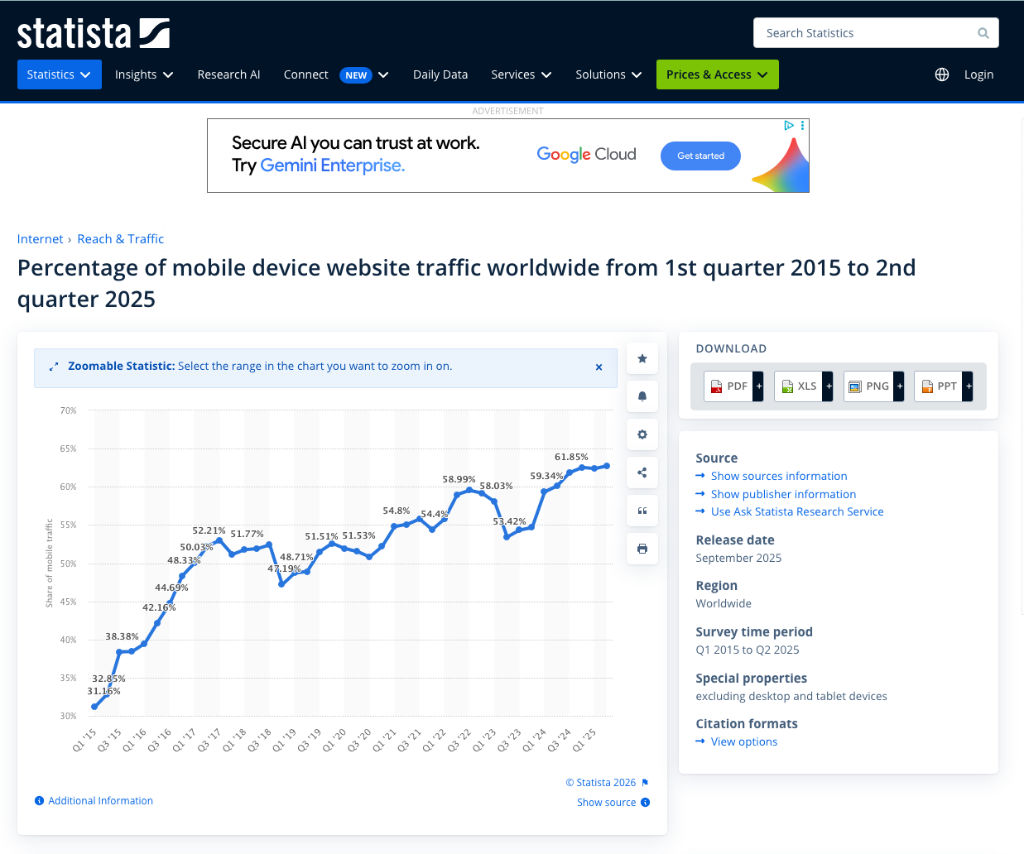
Over 60% of form interactions happen on mobile, but many B2B forms are still built for desktop. On a small screen, text becomes too small to read, buttons are hard to tap, and users have to zoom and scroll excessively. Additionally, the layout becomes harder to scan, with unclear labels, hidden required fields, and missed error messages. This frustrates visitors before they even start filling out the form
When mobile visitors struggle with these issues, fewer complete the form, some leave right away, and others abandon halfway through. The result is a lower conversion rate and fewer leads entering your pipeline.
How To Fix It:
Make your form responsive so that it automatically adjusts to any screen size and use a single-column layout to avoid horizontal scrolling. Always use a mobile-friendly form builder and test the form on real mobile devices with different screen sizes and operating systems before launching it. This improves user experience on phones and tablets, increasing the number of people who submit it.

3. Not Requiring a Business Email
Not requiring a business email is a common mistake in B2B lead capture forms. Without this qualification, forms accept personal email domains like Gmail and Yahoo, allowing low‑intent individuals to enter your pipeline. Although the personal emails are not always useless, they usually come from competitors, students, freelancers, and casual browsers.
As a result, your sales reps need to spend more time filtering contacts manually, which slows down follow-up, making it harder to prioritize real prospects. It also fills your CRM with low-quality contacts that are unlikely to convert. Without a business email, it becomes harder to identify the company behind the lead and route the contact properly.
How To Fix Them:
Ask for a business email address on important forms like demo requests, pricing inquiries, or consultation bookings. This keeps low-intent leads away, makes it easier to prioritize sales leads, and allows your team to focus on real business leads. You can also use progressive profiling: collect any email on the first form and then request the business email on later visits.
4. Clearing the Form After an Error
Clearing a form after an error makes your website look unprofessional and unreliable. When a user fills out a form, clicks submit, and then loses all their information because of one small mistake, they are forced to retype everything. This wastes their time and effort, making the form feel difficult and poorly designed.
Frustrated users abandon the form entirely and leave with a negative impression of your brand. As a result, you lose leads that were already interested enough to complete the form once. This causes your conversion rate to drop, and your lead volume decreases while increasing your cost per lead.
How To Fix It
Keep all the entered data safe instead of wiping all of them after an error. You can use inline validation to spot issues early and show clear error messages next to only the mistaken field. If one field is wrong, only ask them to fix that specific field instead of making them fill out the whole form again. This protects the user’s effort and improves the overall experience.
A form that doesn’t scare leads away
Your lead capture form is the first impression many potential customers get of your business. Therefore, your form should encourage visitors to express their interest, not give them a reason to leave. When your form asks for too many fields, works poorly on mobile, accepts low-quality leads without proper qualification, or clears everything after a small error, it creates friction that hurts conversions.
By fixing these common mistakes, you can improve the user experience, capture more qualified B2B leads, and make your form a stronger part of your lead generation process.